

If you’re building a blog or web app, you’ll need a way to make it accessible online. To do this, you require a computer that can be accessed by individuals via the internet. While you could try using your own laptop or desktop, it’s not practical—websites require a dedicated computer with constant power, storage, and processing capacity. This type of computer is called a server. A server stores your site’s files, images, and data and delivers them to visitors when they enter your domain name (like www.example.com).
Running a server yourself is expensive and requires nonstop operation, cooling, and maintenance. That’s why companies like Amazon, Google, and Microsoft Azure provide cloud infrastructure that lets you host websites without managing physical hardware. They handle the upkeep, backups, and infrastructure, so you can focus on your project.
Hostinger offers different hosting plans depending on how resources are allocated and managed—whether your website shares a server, uses a virtual environment, or runs across multiple servers. They also provide management features like security and updates. In this post, I’ll focus only on Hostinger’s hosting options—how they differ and which one might be best for you. I’ll keep everything simple and practical so you can quickly understand the differences.
Hostinger offers four main types of hosting:
- Web hosting (Shared hosting)
- VPS hosting
- Cloud hosting
- Agency Hosting
Web Hosting (Shared hosting)
Hostinger’s web hosting plans are based on a model called shared hosting. Shared hosting means multiple websites are hosted on the same physical server, sharing resources like CPU, RAM, and bandwidth.
Analogy: Imagine you and 10 friends share a single Wi-Fi connection at home. If one person starts streaming heavily, the internet slows down for everyone. That’s very similar to how shared hosting works—affordable and easy, but resources are shared. It works well for smaller websites with moderate traffic.
Many unrelated customers share the same server. A common concern is: if one website is compromised, does it affect the others?
Modern hosting providers (like Hostinger) use isolation techniques (such as account separation, sandboxing, and firewalls) to reduce this risk. Each account is kept in its own “compartment,” so even if one site is compromised, it’s more difficult (though not impossible) for attackers to affect other accounts.
Pros
Cons
VPS Hosting (Virtual Private Server)
Hostinger’s VPS hosting is based on a model where a physical server is divided into multiple virtual private servers (VPS). Each VPS has its own allocated resources like CPU, RAM, and storage, allowing your website to run more independently from others on the same machine.
Analogy: Imagine renting your own private office floor inside a skyscraper. Other businesses also rent floors in the same building, but your floor is largely yours—you don’t share resources like furniture or workspace with others. You can design the office however you like and run your operations freely. That’s very similar to how VPS hosting works—more control, more power, and minimal interference from others.
Unlike shared hosting, your resources are reserved for you, so another website’s traffic spike is far less likely to affect your performance. You also typically get root access, allowing you to customize the server environment to fit your needs.
Pros
Cons
Cloud Hosting
Hostinger’s cloud hosting option is a type of hosting where your website runs on a network of servers instead of relying on a single physical machine. If one server has a problem, traffic can be redirected to other servers in the network, improving reliability and uptime.
Analogy: Imagine you run a restaurant chain with multiple locations. If one location has a problem, customers can be redirected to another nearby location. Your business continues running because it doesn’t rely on a single place.
A common question is: how is this different from shared or VPS hosting?
While shared and VPS hosting rely on a single physical server, cloud hosting uses a distributed system of multiple servers working together. Virtualization is used in both VPS and cloud hosting, but cloud hosting adds redundancy and flexibility by spreading resources across multiple machines.
Pros
Cons
Agency Hosting
Hostinger’s agency hosting option is designed for agencies, freelancers, and developers who manage multiple client websites under one account. Instead of focusing on a single site, it provides tools to organize, manage, and grant access to multiple websites efficiently.
Analogy: Imagine you rent warehouse space and store goods for different clients. You manage and organize everything, while each client can access their own goods without controlling the entire warehouse.
A common question is: do websites interact the same way as they would in shared hosting?
Agency hosting provides better organization and separation between sites than basic shared hosting, but it does not offer the same level of isolation or control as VPS hosting. Each client site is managed separately within the platform, making it easier to organize and control access, but without the full independence of a VPS environment.
Pros
Cons
Summary Table
For a quick comparison, here’s a simplified overview of the main hosting types:
|
Feature |
Shared Hosting |
VPS Hosting |
Cloud Hosting |
Agency Hosting |
|---|---|---|---|---|
|
Resources |
Shared with many websites |
Allocated portion of server resources |
Distributed across multiple servers |
Multiple sites managed under one account |
|
Isolation |
Basic |
Moderate to strong |
Strong (distributed environment) |
Moderate (better than shared, less than VPS) |
|
Performance |
Can vary depending on usage |
More consistent than shared hosting |
Generally reliable and scalable |
Stable across managed sites |
|
Ease of Use |
Very easy |
Requires technical setup |
Managed and relatively easy |
Easy for managing multiple sites |
|
Best For |
Beginners, small websites |
Developers, custom applications |
Growing websites and businesses |
Agencies and freelancers |
Comparison With Other Hosting Providers.

|
Feature |
||||
|---|---|---|---|---|
|
Real Cost (per year) |
Starts low (~$30–$50/year intro; renewals higher) |
Affordable entry pricing; additional costs may apply for extras |
Higher introductory and renewal pricing |
Premium pricing with higher renewals |
|
Performance (Speed) |
Generally fast for its price range |
Can vary depending on usage and plan |
Moderate performance for shared hosting |
Strong performance with advanced caching |
|
Server Response (TTFB) |
Typically low response times in optimized setups |
Can vary depending on server load |
Moderate response times |
Generally low response times |
|
Technology |
Modern stack (LiteSpeed, cloud infrastructure, SSD) |
Standard hosting stack |
Commonly uses Apache-based infrastructure |
Google Cloud infrastructure with advanced caching |
|
Ease of Use |
Beginner-friendly with custom hPanel |
Simple but less modern interface |
Beginner-friendly with cPanel |
Easy to use but slightly more technical |
|
Support |
Live chat and email support; response times can vary |
Basic support options |
24/7 support via chat and phone |
Highly rated support with strong technical help |
|
Global Servers |
Multiple regions (US, Europe, Asia) |
Limited locations depending on plan |
Primarily US-based infrastructure |
Global infrastructure via cloud network |
|
Sales Approach |
Introductory pricing with higher renewals |
Low upfront pricing with optional add-ons |
Widely promoted with strong brand presence |
Transparent pricing with premium positioning |
|
Best For |
Beginners and budget-conscious users |
Budget users with simple needs |
Beginners who want strong support |
Businesses and users prioritizing performance and support |
Honorable mentions
- A2 Hosting → Known for strong performance, especially on higher-tier plans. Better suited for users with some technical experience.
- GreenGeeks → Eco-friendly hosting with solid performance. Appeals to environmentally conscious users, though pricing can be higher.
- GoDaddy → Popular for domain registration and bundled services. Hosting is easy to use but may not match performance-focused providers.
- InMotion Hosting → Reliable mid-range hosting with strong business features. A good option for small businesses needing stability.
User Feedback
To get a better understanding of real user experiences, I looked at independent review platforms. These ratings are based on thousands of users, giving a more balanced view than promotional pages.
Overall, Hostinger receives consistently strong ratings, particularly for its affordability and ease of use. However, some users mention downsides such as higher renewal prices and occasional support delays.
Trustpilot
Large volume of reviews with a wide mix of user experiences.
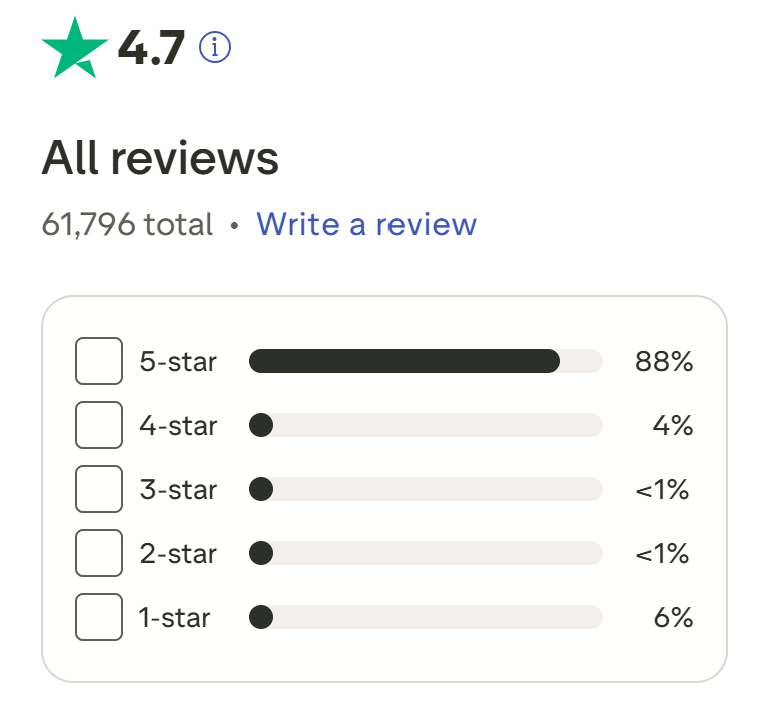
View detailed reviews on Trustpilot.
G2
Focused on software users and business-related feedback.
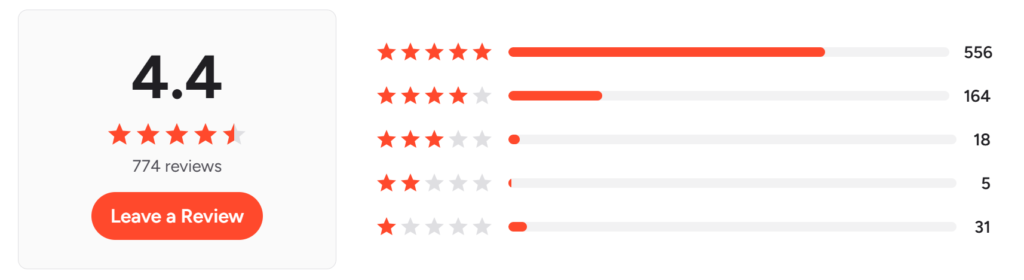
See user feedback on G2.
Capterra
Popular for comparing tools and services across industries.
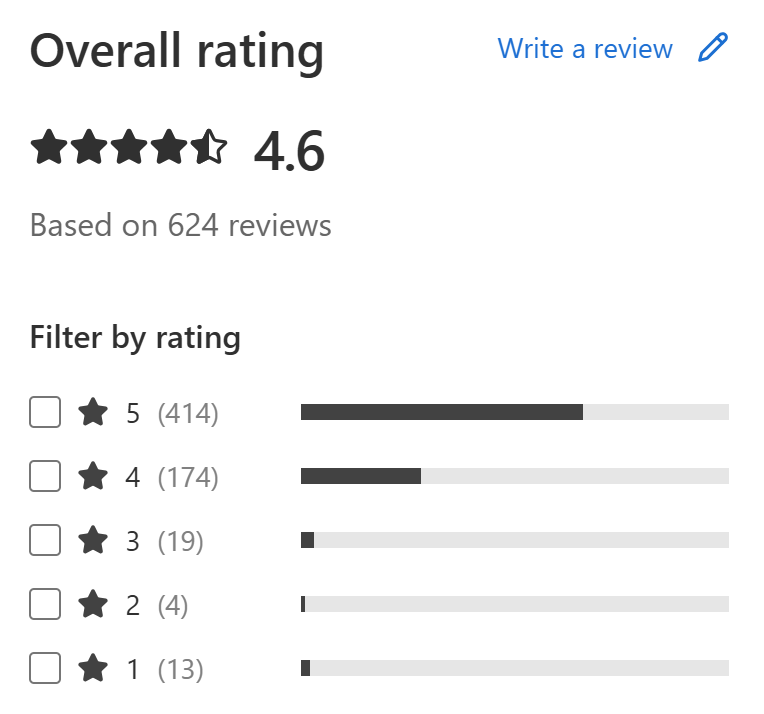
Browse reviews on Capterra.
FAQs About Hostinger Hosting
Why is Hostinger so cheap compared to other providers?
Hostinger uses a combination of its own infrastructure and third-party cloud providers, which helps reduce costs. However, renewal prices are higher than the introductory offers, so long-term costs are not as low as the initial deal.
Does upgrading to a higher Hostinger plan make my site faster?
Not necessarily. All shared hosting plans use similar core technology, so speeds are generally comparable under normal conditions. Upgrading mainly improves your site’s ability to handle more traffic and maintain performance under load, rather than significantly increasing raw speed. Cloud hosting plans often perform better due to their infrastructure.
What technology does Hostinger use?
Hostinger uses LiteSpeed servers, cloud infrastructure, SSD storage, and modern protocols like HTTP/2. These technologies can offer performance advantages compared to more traditional server setups, depending on configuration.
Is Hostinger’s support good?
Hostinger offers live chat and email support, along with a large knowledge base. Response times can vary depending on demand, but are generally reasonable. Compared to some providers, it may involve less step-by-step guidance, but the support team can handle most technical issues effectively.
Why do some users have concerns about Hostinger?
Some negative feedback is usually related to marketing practices, such as:
– Countdown timers that reset automatically.
– Auto‑renew enabled by default, with a difficult cancellation flow.
– Renewal prices much higher than entry offers.
These practices are common across the hosting industry, but Hostinger is often highlighted because it is one of the most widely used budget providers.
Hostinger Hosting Price Structure
Web Hosting (Shared Hosting)
Hostinger’s shared hosting plans are the most affordable option, but the advertised prices are introductory rates. To get the lowest monthly price, you typically need to commit to a long-term plan (often 2–4 years). Renewal prices are significantly higher.
VPS Hosting
Hostinger’s VPS plans provide dedicated resources and more control compared to shared hosting. However, they require some technical knowledge to set up and manage (e.g., server configuration, SSH access).
Cloud Hosting
Hostinger’s cloud hosting plans provide dedicated resources with improved reliability compared to shared hosting. They are managed, meaning less technical setup is required than VPS.
Agency Hosting
Hostinger’s agency hosting is designed for managing multiple websites under one account. It focuses on organization, collaboration, and resource allocation rather than a different underlying hosting infrastructure.
Who Should Use Each Hosting Type (and Why)
Web Hosting (Shared Hosting)
Best for simple websites with low to moderate traffic
- Personal blog or content site → running WordPress with basic features like SSL and backups at a low cost
- Student or portfolio site → hosting projects or resumes without needing technical setup
- Small business website → creating a company site with basic pages, email, and light eCommerce
- First-time website owner → learning how hosting works with a simple, beginner-friendly setup
- Non-profit or community site → publishing informational pages while keeping costs low
VPS Hosting
Best for users who need control and dedicated resources
- Developers → deploying custom apps with root access and control over the server environment
- Growing online store → handling higher traffic without sharing resources with other sites
- SaaS or startup projects → running applications that need consistent performance and isolation
- Technical users → configuring servers, using SSH, and managing custom stacks
- Game servers or similar workloads → running applications that require stable resources and customization
Cloud Hosting
Best for websites that need more stability under increasing traffic
- Business websites with growing traffic → reducing slowdowns during traffic spikes
- Content-heavy sites → hosting images, blogs, or media without frequent performance drops
- Active online stores → handling more users and transactions more reliably than shared hosting
- Online learning platforms → supporting multiple users accessing content at the same time
- News or high-update websites → keeping the site responsive during traffic bursts
Agency Hosting
Best for managing multiple websites under one account
- Freelancers → hosting and maintaining several client websites in one place
- Web design agencies → managing multiple sites with staging and team access
- Marketing teams → running campaign pages and client sites with centralized control
- Client-based businesses → offering hosting as part of a service package
Who Hostinger May Not Be Ideal For
- Large-scale or enterprise projects → may require more advanced infrastructure and dedicated support than Hostinger typically provides
- Users needing highly customized server environments → flexibility is more limited compared to premium cloud platforms
- Hands-off users expecting fully managed hosting → some plans still require basic setup and ongoing maintenance
- Projects with very high or unpredictable traffic → lower-tier plans may struggle under sudden traffic spikes
- Users focused on long-term pricing stability → renewal prices are significantly higher than the introductory rates
My Verdict
Hostinger is a practical choice for most users, especially if you’re looking for affordable hosting with a relatively easy setup.
It may not match the performance or advanced features of higher-end providers, but it covers the essentials well at a much lower cost.
Where Hostinger Stands Out
- Low entry pricing → one of the more affordable ways to get started with hosting
- Discounted long-term plans → useful if you’re comfortable committing upfront
- Global data centers → helps reduce latency depending on your audience location
- LiteSpeed caching on lower-tier plans → improves loading speeds without extra setup
- Free SSL and backups → included features that are sometimes paid elsewhere
- Beginner-friendly hPanel → simpler to navigate compared to traditional control panels
- WordPress tools on lower tiers → includes staging features without needing higher plans
- Transparent resource limits → clearer expectations on what each plan can handle
- Agency and VPS options → allows upgrading without switching providers
Most of these features are not unique, but having them included at lower price points is where Hostinger becomes more appealing.
In terms of performance, Hostinger is generally reliable for small to medium-sized websites. It may not reach the same level as higher-priced providers like SiteGround or WP Engine, particularly under heavier workloads. However, it typically performs better than many budget-focused providers such as GoDaddy or HostGator, while remaining competitively priced.
Hostinger also offers a 30-day money-back guarantee, so you can test it and see if it fits your needs without long-term risk.
Hostinger works well if you:
- want to keep costs low
- are building a small to medium website
- prefer a simpler setup without too much technical overhead
It may not be the right fit if you need high-end performance, advanced infrastructure, or fully managed hosting.
I personally use Hostinger, and based on my experience combined with industry comparisons, it’s a strong option for beginners. If you choose to go with Hostinger, you can use the links in this article to get the current pricing—this helps support the site at no extra cost to you.
Affiliate Disclaimer
Please note that most of the links to Hostinger are referral links. This means that if you choose to purchase through my link, I may earn a commission—at no additional cost to you.
Read More...

Your support is greatly appreciated.
Note: The links to other alternative hosting providers are not affiliate links. I simply want to help you explore all your options before making a purchase decision.
